

- Use Case 8: Schedule Tax Payments
- Use Case 8: Schedule Tax Payments
Use Case 8: Schedule Tax Payments
Use Case 8: Schedule Tax Payments
Schedule tax payments for tax accounts, list them, and mark them as paid manually.
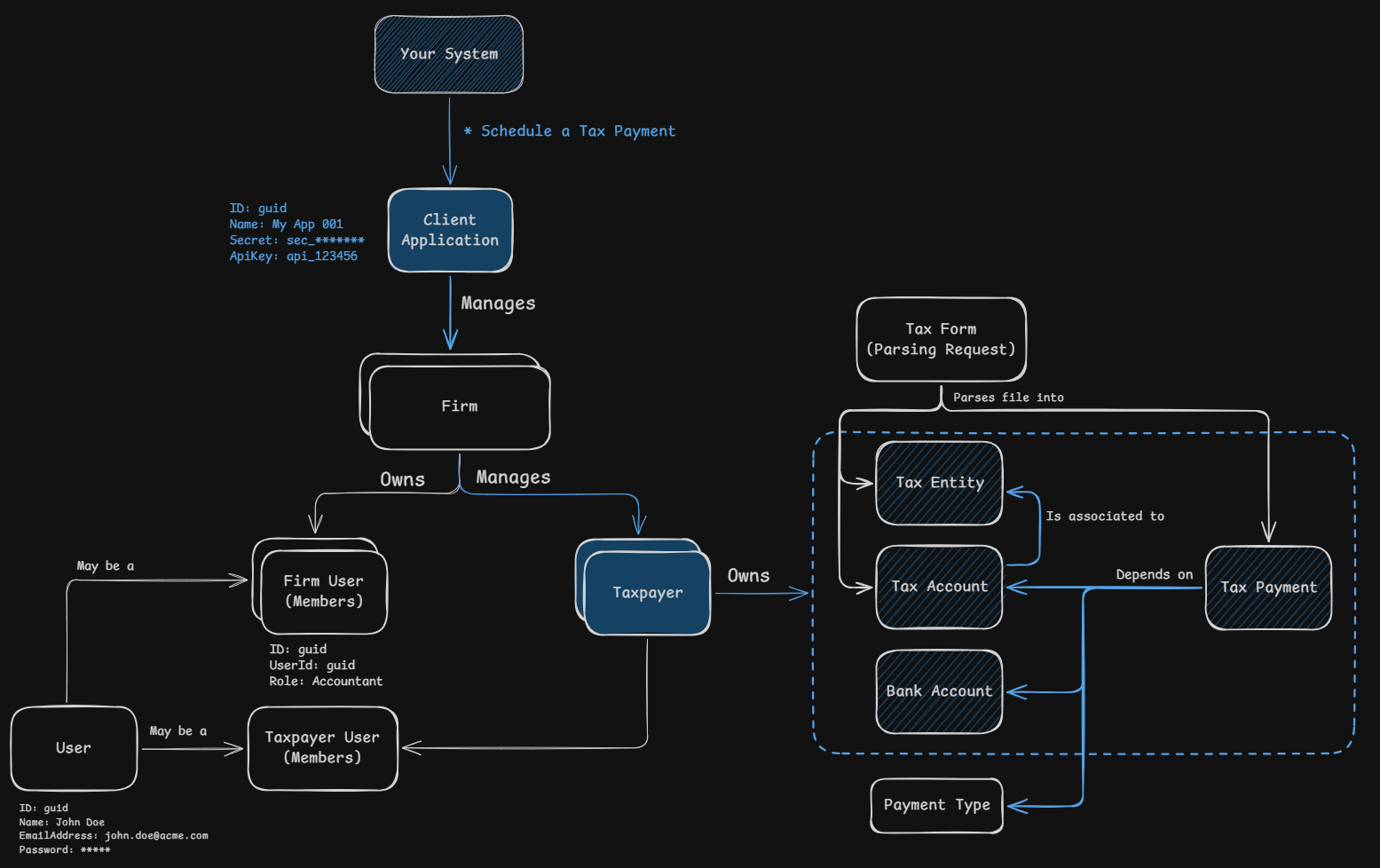
Schedule tax payments associated with tax accounts. Create tax payments using your system’s tax payment ID with the externalId field. Each tax payment must be associated with an existing tax account.
Understanding Tax Payments
Tax payments represent scheduled payments for tax obligations associated with a tax account. Once created, the tax payment will be in Pending Approval status until approved by the taxpayer or firm user. A bank account must be associated before the payment can be processed — you can provide it at creation time with the optional bankAccountId field, or associate it later. Once approved and a bank account is set up, the payment will move to Queued For Payment status and Remitian will process it on the scheduled date.
The complete list of payment types, with the paymentTypeId values accepted by the API, is available at Available Payment Types.
Tax Payment Object Structure:
| Field | Type | Description |
|---|---|---|
id | guid | Unique identifier for the tax payment Example: 069bc3f4-d65e-73f7-8133-f5800e825514 |
externalId | string | Your system’s unique identifier Example: my_tax_payment_123 |
taxAccountId | guid | Associated tax account identifier Example: 059bc3f4-d65e-73f7-8133-f5800e825513 |
bankAccountId | guid | (Optional) Funding bank account for the payment. Can be provided at creation or associated later; required before the payment can be processed Example: 049bc3f4-d65e-73f7-8133-f5800e825512 |
taxAuthority | string | (Deprecated) Still required, but the value is ignored: the tax authority always comes from the tax account Example: US_IRS |
paymentTypeId | number | Type of the tax payment, see the Available Payment Types page Example: 10101 |
periodEndDate | date | End date of the tax period the payment covers Example: 2026-12-31 |
paymentDate | date | Scheduled payment date Example: 2026-12-31 |
amount | decimal | Payment amount Example: 100.00 |
Tax Payment Statuses
The status field of a tax payment and the statuses filter of List Tax Payments use the values below.
| Status | Description |
|---|---|
PendingClientApproval | Awaiting approval from the taxpayer |
PendingAccountantApproval | Awaiting approval from the accountant |
PendingRepresentativeApproval | Awaiting approval from a taxpayer representative |
QueuedForPayment | Approved and queued for processing on the scheduled date |
Submitted | Submitted to the tax authority, not yet pulled |
ProcessingSubmission | Submission to the tax authority in progress |
ProcessingPayment | Funds being prepared for the bank |
Processed | Payment completed |
PaidManually | Paid outside Remitian; marked by the firm in the Remitian platform or through the API |
QueuedForReminder | Queued for a payment reminder instead of processing |
ReminderSent | Reminder notification sent to the taxpayer |
PaymentLinkClicked | Taxpayer clicked the external tax authority payment link (outcome unknown) |
Expired | Approval window expired before the payment was approved |
Denied | Approval was denied |
Voided | Cancelled before processing |
Failed | Payment processing failed |
Deleted | Marked as deleted |
Payment Approval
A tax payment may need an approval before Remitian processes it. Who has to approve, and the status the payment starts in, depend on who created the payment and on the settings of the firm.
Payments Created Through the Public API
A payment created with Schedule a Tax Payment or in a tax payment batch is created by your client application, not by a firm user. Remitian checks the conditions below in order, and the first one that matches applies.
| Condition | Starting status | Who acts next |
|---|---|---|
| The taxpayer has an active taxpayer representative | PendingRepresentativeApproval | The representative approves the payment |
The firm has skipClientApproval set to true | QueuedForPayment | Nobody. The payment is processed on its payment date |
The firm has requireInternalApproval set to true and the taxpayer is owned by a firm user | PendingAccountantApproval | The firm user that owns the taxpayer approves it. The payment then moves to PendingClientApproval |
| None of the above | PendingClientApproval | The taxpayer approves the payment |
With skipClientApproval set to true the payment is queued when it is created, so the request must include bankAccountId. A request without it is rejected.
A taxpayer is owned by a firm user when you send ownerFirmUserId at creation or call Change the Owner of a Taxpayer.
Payments Created in the Widgets
| Widget | What happens |
|---|---|
| Pay with Remitian | The taxpayer creates the payment and approves it in the same flow, so it starts in QueuedForPayment. When a payment already exists for taxPayment.externalId and is in PendingClientApproval, the widget asks the taxpayer to approve it; see Existing Payments |
| Pay All | The widget does not create payments. It lists the payments of the tax entity that are in PendingClientApproval and the taxpayer approves them in one session |
A payment in PendingAccountantApproval or PendingRepresentativeApproval cannot be approved by the taxpayer in a widget until the firm user or the representative approves it.
Firm Settings
Both settings belong to the firm and are set with Create a Firm or changed later with PATCH /v1/firms/{firmId}. Both default to false.
| Setting | Effect |
|---|---|
skipClientApproval | When true, payments that do not need another approval skip the taxpayer approval and start in QueuedForPayment. This includes every payment created through the Public API, even when requireInternalApproval is true |
requireInternalApproval | When true, a payment for a taxpayer that is owned by a firm user starts in PendingAccountantApproval, and the owner approves it before the taxpayer does. This applies to the payments created through the Public API when skipClientApproval is false, and to the payments created in the Remitian platform by a firm user who does not own the taxpayer. Firm Admin users and firm users with the CanSendApprovalDirectlyToClient permission are not affected |
After the Approval
| Action | Resulting status |
|---|---|
| The last required approval is given | QueuedForPayment |
| The approver denies the payment | Denied |
| The payment is not approved in time | Expired |
Remitian sends the schedule.PendingApproval.v1 webhook when a payment starts to wait for an approval, and schedule.QueuedForPayment.v1 when it is approved. See Webhook Events and the full list of statuses in Tax Payment Statuses.
Schedule a Tax Payment
Sequence of Events:
- Your system sends a request to schedule a tax payment using an external ID and associates it with an existing tax account
- Remitian responds with the created tax payment’s details
- Your system can then use this
idfor subsequent operations
HTTP Request:
POST https://public-api.remitian.com/v1/taxpayers/{taxpayerId}/tax-payments
Content-Type: application/json
Authorization: Bearer YOUR_ACCESS_TOKEN
x-api-key: YOUR_API_KEY

{
  "externalId": "my_tax_payment_123",
  "taxAccountId": "059bc3f4-d65e-73f7-8133-f5800e825513",
  "bankAccountId": "049bc3f4-d65e-73f7-8133-f5800e825512",
  "taxAuthority": "US_IRS",
  "paymentTypeId": 10101,
  "periodEndDate": "2026-12-31",
  "paymentDate": "2026-12-31",
  "amount": 100.00
}
Note: bankAccountId is optional. Omit it to associate a bank account later; the payment cannot be processed until one is set.
Validation:
paymentTypeIdmust belong to the tax account’s tax authority.- The payment type must match the tax account type:
Personaltax accounts accept only individual payment types (e.g. Form 1040, Form 706), andCorporatetax accounts accept only business payment types (e.g. Form 1120, Form 1065).
A mismatch returns 400 Bad Request, naming the conflicting values in the response body:
HTTP/1.1 400 Bad Request
Content-Type: application/problem+json

{
  "type": "https://tools.ietf.org/html/rfc9110#section-15.5.1",
  "title": "One or more validation errors occurred.",
  "status": 400,
  "errors": {
    "Schedule.PaymentTypeTaxAccountTypeMismatch": [
      "The payment type 'US_IRS_1120_CORPORATION_INCOME_TAX_BALANCE_DUE_ON_RETURN_OR_NOTICE' cannot be used with a 'Personal' tax account."
    ]
  }
}
HTTP Response:
HTTP/1.1 201 Created
Content-Type: application/json

{
  "id": "069bc3f4-d65e-73f7-8133-f5800e825514",
  "externalId": "my_tax_payment_123"
}
List Tax Payments
Sequence of Events:
- Your system sends a request to list all tax payments associated with a specific taxpayer
- You can filter tax payments by
statuses,taxAuthorities,taxEntityIds,taxAccountIds, and/orexternalIds - Remitian responds with a paginated list of tax payments
Query Parameters:
| Parameter | Type | Description |
|---|---|---|
statuses | string | Filter by status. Comma-separated for multiple values — see Tax Payment Statuses Example: PendingClientApproval,Processed |
taxAuthorities | string | Filter by tax authority. Comma-separated for multiple values — see Available Tax Authorities in Manage Tax Accounts Example: US_IRS,US_CA |
taxEntityIds | guid | Filter by tax entity. Comma-separated for multiple values Example: 039bc3f4-d65e-73f7-8133-f5800e825511 |
taxAccountIds | guid | Filter by tax account. Comma-separated for multiple values Example: 059bc3f4-d65e-73f7-8133-f5800e825513 |
externalIds | string | Filter by your system’s tax payment ID. Comma-separated for multiple values Example: my_tax_payment_123 |
paymentDateFrom / paymentDateTo | date | Filter by scheduled payment date range Example: 2026-12-01 |
submissionDateFrom / submissionDateTo | date | Filter by submission date range Example: 2026-12-01 |
pageNumber | number | Page to retrieve Example: 1 |
pageSize | number | Items per page Example: 10 |
Multi-value format: to filter by more than one value, pass them comma-separated in a single query parameter, e.g. ?statuses=PendingClientApproval,Processed. Repeating the query key (?statuses=PendingClientApproval&statuses=Processed) is not supported — the API Gateway forwards only one of the repeated values and silently drops the rest. Comma-separated is the only supported multi-value format.
HTTP Request:
GET https://public-api.remitian.com/v1/taxpayers/{taxpayerId}/tax-payments?statuses=PendingClientApproval,Processed
Authorization: Bearer YOUR_ACCESS_TOKEN
x-api-key: YOUR_API_KEY
HTTP Response:
HTTP/1.1 200 OK
Content-Type: application/json

{
  "items": [
    {
      "id": "069bc3f4-d65e-73f7-8133-f5800e825514",
      "externalId": "my_tax_payment_123",
      "taxAccountId": "059bc3f4-d65e-73f7-8133-f5800e825513",
      "bankAccountId": "049bc3f4-d65e-73f7-8133-f5800e825512",
      "paymentTypeId": 10101,
      "status": "Processed",
      "periodEndDate": "2026-12-31",
      "paymentDate": "2026-12-31",
      "amount": 100.00
    }
  ],
  "currentPage": 1,
  "pageSize": 10,
  "totalCount": 1,
  "totalPages": 1
}
Accepted statuses Values: every status listed in Tax Payment Statuses.
Validation:
An unknown value passed to any filter returns 400 Bad Request, naming the invalid value in the response body:
HTTP/1.1 400 Bad Request
Content-Type: application/problem+json

{
  "type": "https://tools.ietf.org/html/rfc9110#section-15.5.1",
  "title": "One or more validation errors occurred.",
  "status": 400,
  "errors": {
    "Statuses": [
      "'Unknown' is not a valid Statuses value."
    ]
  }
}
Known limitation: an external ID that contains a comma cannot be used with the externalIds filter — the comma is always interpreted as a value separator, so a comma-containing ID gets split into multiple (incorrect) filter values.
Mark a Tax Payment as Paid Manually
Use this when the tax payment was paid outside Remitian, for example directly on the tax authority’s website. Remitian stops processing the tax payment and will not pull the funds.
Sequence of Events:
- Your system sends a request with the
taxpayerIdand theidof the tax payment - Remitian sets the tax payment to Paid Manually and responds with
204 No Content - Remitian sends the
schedule.PaidManually.v1webhook, see Webhooks
HTTP Request:
POST https://public-api.remitian.com/v1/taxpayers/{taxpayerId}/tax-payments/{taxPaymentId}/mark-paid-manually
Authorization: Bearer YOUR_ACCESS_TOKEN
x-api-key: YOUR_API_KEY
The request has no body.
HTTP Response:
HTTP/1.1 204 No Content
Statuses That Can Be Marked as Paid Manually:
PendingClientApprovalPendingAccountantApprovalQueuedForPaymentPaymentLinkClicked
A tax payment in any other status returns 409 Conflict, naming the current status in the response body:
HTTP/1.1 409 Conflict
Content-Type: application/problem+json

{
  "type": "https://tools.ietf.org/html/rfc9110#section-15.5.10",
  "title": "Cannot mark as paid manually because the status is 'Processed'.",
  "status": 409
}
A tax payment that does not exist, or that belongs to another taxpayer, returns 404 Not Found.
Note: It is safe to repeat the request. A tax payment that is already PaidManually returns 204 No Content again, and the webhook is not sent a second time.
Tax Payment Batches
To schedule many tax payments at once, submit up to 5,000 tax payments for the taxpayers of one firm in a single request. Remitian schedules each item asynchronously and sends the batch.Processed.v1 webhook event when every item has an outcome.
See Tax Payment Batches for the integration flow, the endpoints, the webhook and the error handling.