

- Use Cases
- Use Case 6: Manage Tax Identity Verifications
Use Cases
Use Case 6: Manage Tax Identity Verifications
Create and follow tax identity verifications with tax authorities, and discover the fields each one requires.
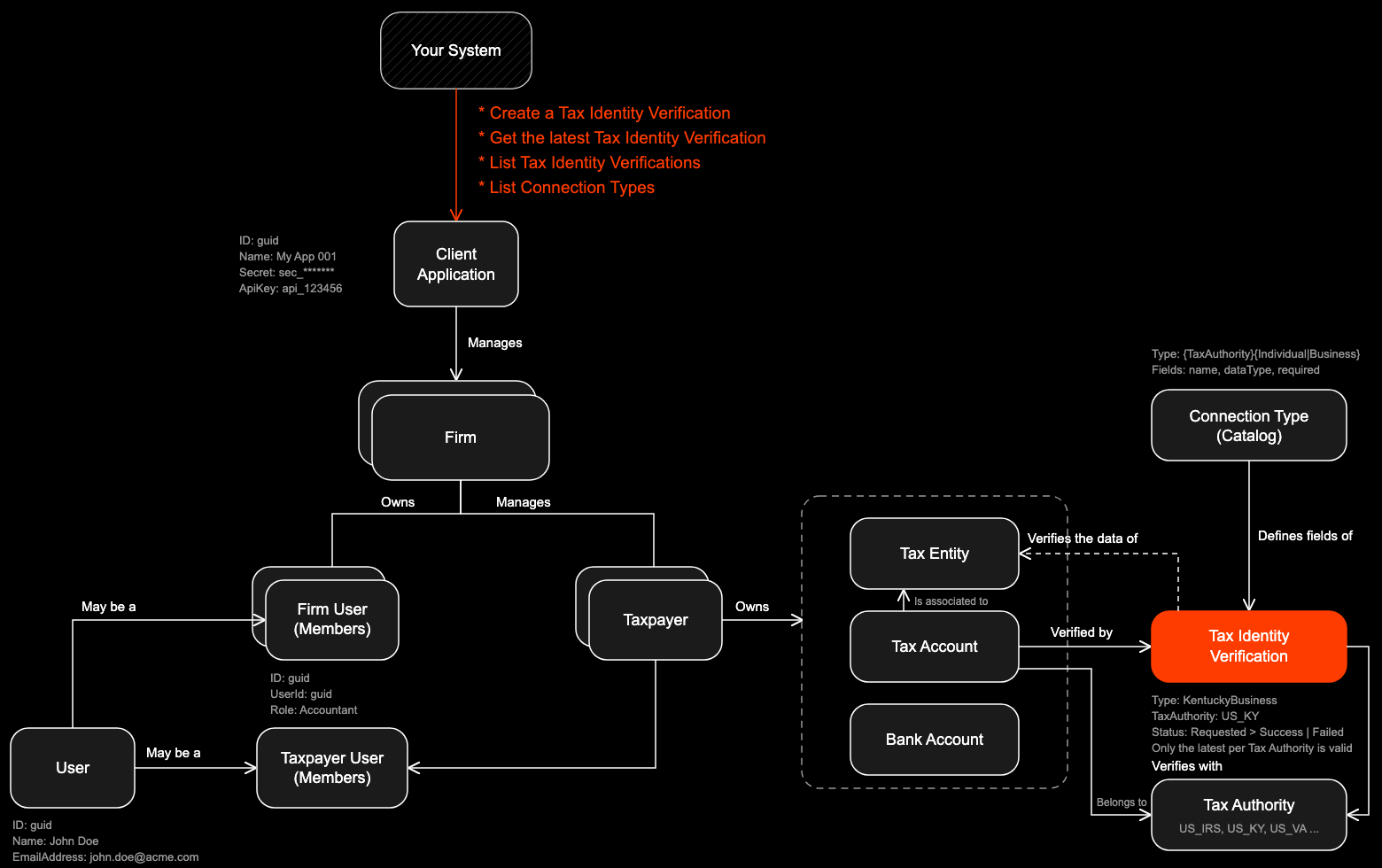
Manage tax identity verifications associated with tax entities. Create a verification for any supported tax authority through a single endpoint, discover the fields each tax authority requires with the connection type catalog, and list verifications to follow their status. Each verification must be associated with an existing tax entity that already has a tax account for the tax authority being verified.
Understanding Tax Identity Verifications
A tax identity verification (also called a connection) checks a tax entity’s data with one tax authority. It corresponds to the tax entity’s tax account for that authority (see Use Case 5): Remitian submits the information the authority requires and tracks the outcome. Only the latest verification per tax authority is valid for a tax entity; earlier ones are kept as history.
- A verification targets one tax entity and one tax authority.
- A new verification is accepted only when the latest one for the same tax authority is Failed, Created or PendingManualReview. While the latest one is Requested or AwaitingConfirmation, or once it reached Success, the request is rejected with 409 Conflict.
- After the maximum number of failed attempts, the tax authority is locked for that tax entity and new attempts are rejected.
- The fields each tax authority requires come from the connection type catalog, so your integration does not need to hardcode them.
Verification Statuses:
| Status | Meaning |
|---|---|
Created | The verification was recorded and is about to be submitted |
Requested | Submitted to the tax authority, waiting for a result |
PendingManualReview | Remitian is reviewing the request manually before completing it |
AwaitingConfirmation | Waiting for a confirmation step before the result is final |
Success | The tax authority verified the identity |
Failed | The tax authority rejected the request. errors carries the authority messages. A new verification can be created |
FailedMaxReached | The maximum number of failed attempts was reached. New verifications for this tax authority are rejected |
Tax Identity Verification Object Structure:
| Field | Type | Description |
|---|---|---|
id | guid | Unique identifier for the verification Example: 6f1c2d3e-8a4b-4c5d-9e6f-7a8b9c0d1e2f |
taxEntityId | guid | Associated tax entity identifier Example: 039bc3f4-d65e-73f7-8133-f5800e825511 |
type | string | Connection type used to create the verification Example: KentuckyBusiness |
taxAuthority | string | Tax authority Example: US_KY |
taxEntityType | string | Type of the tax entity Example: IrsEin |
status | string | Current status, see the table above Example: Success |
taxYear | number | Tax year the verification refers to Example: 2025 |
requestedAt | datetime | When the verification was created Example: 2026-10-08T13:00:00Z |
lastUpdatedAt | datetime | When the status last changed Example: 2026-10-09T09:30:00Z |
errors | string[] | Messages returned by the tax authority when status is Failed, otherwise empty. Only present on the latest verification endpoint |
Connection Types and Field Catalog
Every verification request is identified by a type, named {TaxAuthority}{Individual|Business}. For example, IrsIndividual verifies an individual with the IRS and KentuckyBusiness verifies a business with the Kentucky Department of Revenue.
The type must match the type of the tax entity:
| Tax Entity Type | Connection Types |
|---|---|
IrsSsn (individual) | {TaxAuthority}Individual, for example IrsIndividual, VirginiaIndividual |
IrsEin (business) | {TaxAuthority}Business, for example IrsBusiness, VirginiaBusiness |
Use the List Connection Types endpoint below to discover the supported connection types, the tax authority each one targets and the fields it requires. Every field is described by its name (the JSON property to send), its dataType, whether it is required, and the bounds Remitian enforces on it (minLength, maxLength, min, max, exclusiveMin, exclusiveMax); composite fields such as address list their own fields.
Field Data Types:
| Data Type | JSON value to send |
|---|---|
string | "text" |
integer | 2025 |
decimal | 12500.50 |
boolean | true |
date | "1980-05-14" |
address | Address object: address1, address2, apartmentOrSuite, poBox, city, region, country, postalCode |
enum:FilingStatus | One of the filing status values, for example "MarriedFiledJointReturn" |
taxYear is required for every connection type.
Integration Flow
Sequence of Events:
- Your system creates a tax entity (see Use Case 4) or selects an existing one
- Your system creates a tax account for that tax entity and the tax authority to be verified (see Use Case 5). The tax account must exist before the verification is created
- Your system calls List Connection Types to learn which fields the tax authority requires for that entity type
- Your system collects the fields and creates the verification with a single
POST - Remitian responds with
201 Createdand the initial status - Your system follows the verification through the
taxIdentityVerification.*webhook events or Get the Latest Verification until it reachesSuccessorFailed - On
Failed, your system readserrors, corrects the information and creates a new verification
List Connection Types
Sequence of Events:
- Your system requests the catalog, optionally filtered by one or more
types - Remitian responds with the supported connection types and the fields each one requires
- Your system builds the verification request from the field list
HTTP Request:
GET https://public-api.sandbox.remitian.com/v1/tax-identity-verifications/connection-types?types=IrsIndividual,KentuckyBusiness
Authorization: Bearer YOUR_ACCESS_TOKEN
x-api-key: YOUR_API_KEY
The types filter is optional and accepts multiple values. Omit it to receive the whole catalog. The response is static and can be cached for 24 hours (Cache-Control: max-age=86400).
HTTP Response:
HTTP/1.1 200 OK
Content-Type: application/json
Cache-Control: max-age=86400

[
  {
    "type": "IrsIndividual",
    "taxAuthority": "US_IRS",
    "taxEntityType": "IrsSsn",
    "fields": [
      { "name": "taxYear", "dataType": "integer", "required": true, "min": 2019, "exclusiveMin": true },
      { "name": "filingStatus", "dataType": "enum:FilingStatus", "required": true },
      { "name": "firstName", "dataType": "string", "required": true, "minLength": 2, "maxLength": 256 },
      { "name": "lastName", "dataType": "string", "required": true, "minLength": 2, "maxLength": 256 },
      { "name": "dateOfBirth", "dataType": "date", "required": true },
      {
        "name": "address", "dataType": "address", "required": true,
        "fields": [
          { "name": "address1", "dataType": "string", "required": false, "minLength": 3 },
          { "name": "address2", "dataType": "string", "required": false },
          { "name": "apartmentOrSuite", "dataType": "string", "required": false },
          { "name": "poBox", "dataType": "string", "required": false, "minLength": 1 },
          { "name": "city", "dataType": "string", "required": true, "minLength": 2 },
          { "name": "region", "dataType": "string", "required": false },
          { "name": "country", "dataType": "string", "required": true, "minLength": 2 },
          { "name": "postalCode", "dataType": "string", "required": true, "minLength": 3 }
        ]
      }
    ]
  },
  {
    "type": "KentuckyBusiness",
    "taxAuthority": "US_KY",
    "taxEntityType": "IrsEin",
    "fields": [
      { "name": "taxYear", "dataType": "integer", "required": true, "min": 2019, "exclusiveMin": true },
      { "name": "taxAccountId", "dataType": "string", "required": true, "minLength": 2, "maxLength": 256 },
      { "name": "businessName", "dataType": "string", "required": true, "minLength": 2, "maxLength": 256 },
      { "name": "grossReceiptsNet", "dataType": "decimal", "required": true, "min": 0, "exclusiveMin": true }
    ]
  }
]
Each field carries the length and numeric bounds Remitian enforces on it, so you can validate those before submitting. minLength and maxLength apply to strings; min and max apply to integer and decimal fields and are inclusive unless exclusiveMin or exclusiveMax is true. A bound is absent when the field has no length or numeric rule. Composite fields (address, electronicSignature) list their own fields with the same properties. The catalog does not describe every rule: format patterns such as email or postal code, conditional requirements (an address needs either address1 or poBox), fixed values (electronicSignature.acknowledged must be true) and date ranges (electronicSignature.expirationDate must be at least five years from today) are only enforced when you submit.
Create a Tax Identity Verification
Sequence of Events:
- Your system sends a request with the
typeand the fields listed in the catalog for that type - Remitian validates the request, records the verification and submits it to the tax authority
- Remitian responds with the verification’s details and a
Locationheader pointing to the latest verification for that tax authority - Your system follows the status until the verification completes
HTTP Request (IRS Individual):
POST https://public-api.remitian.com/v1/taxpayers/{taxpayerId}/tax-entities/{taxEntityId}/tax-identity-verifications
Content-Type: application/json
Authorization: Bearer YOUR_ACCESS_TOKEN
x-api-key: YOUR_API_KEY

{
  "type": "IrsIndividual",
  "taxYear": 2025,
  "filingStatus": "MarriedFiledJointReturn",
  "firstName": "Alice",
  "lastName": "Smith",
  "dateOfBirth": "1980-05-14",
  "address": {
    "address1": "123 Main St",
    "city": "Springfield",
    "region": "IL",
    "country": "US",
    "postalCode": "62701"
  }
}
HTTP Response:
HTTP/1.1 201 Created
Content-Type: application/json
Location: /v1/taxpayers/{taxpayerId}/tax-entities/{taxEntityId}/tax-identity-verifications/latest?taxAuthority=US_IRS

{
  "id": "6f1c2d3e-8a4b-4c5d-9e6f-7a8b9c0d1e2f",
  "type": "IrsIndividual",
  "taxAuthority": "US_IRS",
  "taxEntityType": "IrsSsn",
  "status": "Requested"
}
HTTP Request (Virginia Business):
POST https://public-api.remitian.com/v1/taxpayers/{taxpayerId}/tax-entities/{taxEntityId}/tax-identity-verifications
Content-Type: application/json
Authorization: Bearer YOUR_ACCESS_TOKEN
x-api-key: YOUR_API_KEY

{
  "type": "VirginiaBusiness",
  "taxYear": 2025,
  "businessName": "Acme Corporation",
  "email": "owner@acme.com",
  "phoneNumber": "5551234567",
  "address": {
    "address1": "456 Corporate Blvd",
    "city": "Richmond",
    "region": "VA",
    "country": "US",
    "postalCode": "23219"
  },
  "businessRepFirstName": "John",
  "businessRepLastName": "Doe",
  "title": "CFO",
  "businessNumberSuffix": "001",
  "businessTaxClassification": "Corporation"
}
HTTP Request (Tennessee Business, authority-specific fields only):
POST https://public-api.remitian.com/v1/taxpayers/{taxpayerId}/tax-entities/{taxEntityId}/tax-identity-verifications
Content-Type: application/json
Authorization: Bearer YOUR_ACCESS_TOKEN
x-api-key: YOUR_API_KEY

{
  "type": "TennesseeBusiness",
  "taxYear": 2025,
  "franchiseExciseTaxAccountNumber": "1234567890"
}
For Tennessee Business, either franchiseExciseTaxAccountNumber or businessTaxAccountNumber must be informed.
Get the Latest Verification
Sequence of Events:
- Your system requests the latest verification of a tax entity for a specific tax authority
- Remitian responds with the verification and its current status
- On
Failed, your system readserrorsbefore creating a new verification
HTTP Request:
GET https://public-api.remitian.com/v1/taxpayers/{taxpayerId}/tax-entities/{taxEntityId}/tax-identity-verifications/latest?taxAuthority=US_KY
Authorization: Bearer YOUR_ACCESS_TOKEN
x-api-key: YOUR_API_KEY
taxAuthority is required.
HTTP Response:
HTTP/1.1 200 OK
Content-Type: application/json

{
  "id": "6f1c2d3e-8a4b-4c5d-9e6f-7a8b9c0d1e2f",
  "taxEntityId": "049bc3f4-d65e-73f7-8133-f5800e825512",
  "type": "KentuckyBusiness",
  "taxAuthority": "US_KY",
  "taxEntityType": "IrsEin",
  "status": "Success",
  "taxYear": 2025,
  "requestedAt": "2026-10-08T13:00:00Z",
  "lastUpdatedAt": "2026-10-09T09:30:00Z",
  "errors": []
}
List Verifications
Sequence of Events:
- Your system requests the verification history of a tax entity
- You can filter by
taxAuthorityif needed - Remitian responds with a paginated list, newest first
HTTP Request:
GET https://public-api.remitian.com/v1/taxpayers/{taxpayerId}/tax-entities/{taxEntityId}/tax-identity-verifications?taxAuthority=US_KY&pageNumber=1&pageSize=10
Authorization: Bearer YOUR_ACCESS_TOKEN
x-api-key: YOUR_API_KEY
HTTP Response:
HTTP/1.1 200 OK
Content-Type: application/json

{
  "items": [
    {
      "id": "6f1c2d3e-8a4b-4c5d-9e6f-7a8b9c0d1e2f",
      "taxEntityId": "049bc3f4-d65e-73f7-8133-f5800e825512",
      "type": "KentuckyBusiness",
      "taxAuthority": "US_KY",
      "taxEntityType": "IrsEin",
      "status": "Success",
      "taxYear": 2025,
      "requestedAt": "2026-10-08T13:00:00Z",
      "lastUpdatedAt": "2026-10-09T09:30:00Z"
    },
    {
      "id": "1a2b3c4d-5e6f-4a7b-8c9d-0e1f2a3b4c5d",
      "taxEntityId": "049bc3f4-d65e-73f7-8133-f5800e825512",
      "type": "KentuckyBusiness",
      "taxAuthority": "US_KY",
      "taxEntityType": "IrsEin",
      "status": "Failed",
      "taxYear": 2025,
      "requestedAt": "2026-10-01T10:00:00Z",
      "lastUpdatedAt": "2026-10-01T10:05:00Z"
    }
  ],
  "currentPage": 1,
  "pageSize": 10,
  "totalCount": 2,
  "totalPages": 1
}
A tax entity with no verifications returns 200 OK with an empty items list.
Following a Verification
A verification usually completes asynchronously. You can follow it in two ways:
- Webhooks: subscribe to
taxIdentityVerification.Created.v1,taxIdentityVerification.Succeeded.v1andtaxIdentityVerification.Failed.v1so your system does not need to poll. The payload and the status each event carries are described on the Webhooks page. - Get the Latest Verification: call the endpoint above until
statusisSuccess,FailedorFailedMaxReached.
Get the Latest Verification is the source of truth: only the latest verification per tax authority is valid for a tax entity, and a webhook event carries the status at the moment it was raised. When an event arrives, read the latest verification before acting on it.
Error Handling
| HTTP Status | When it happens |
|---|---|
400 Bad Request | type is missing or unknown, a required field is missing, taxYear is invalid, type does not match the tax entity type, taxAuthority is missing or invalid, or the page parameters are invalid |
403 Forbidden | The taxpayer does not exist, or your client application has no access to it |
404 Not Found | The tax entity does not exist or belongs to another taxpayer, or (latest only) the tax entity was never verified with that tax authority |
409 Conflict | A verification for the same tax authority is still in progress, or the maximum number of failed attempts was reached |
Validation errors name the property in the response body. Request body properties use their PascalCase name (TaxYear, Address.City, or Type when the type does not match the tax entity), as in the other Public API endpoints, and query parameters use the parameter name (taxAuthority, types). Two body errors are keyed differently: a body without type is reported under request and an empty key "", and an unknown type value under type. A missing city looks like this:
HTTP/1.1 400 Bad Request
Content-Type: application/problem+json

{
  "type": "https://tools.ietf.org/html/rfc9110#section-15.5.1",
  "title": "One or more validation errors occurred.",
  "status": 400,
  "errors": {
    "Address.City": [
      "The City field is required."
    ]
  }
}
Limitations
- Only the latest verification per tax authority is valid for a tax entity.
- A new verification is rejected with
409 Conflictwhile another one for the same tax authority is in progress. - A tax authority is locked for a tax entity after the maximum number of failed attempts (
FailedMaxReached).
Need Help?
Our support team is here to assist you:
- Email: support@remitian.com
- Response Time: Within 1-2 business days