

- Use Cases
- Use Case 2: Manage Firm Users
Use Cases
Use Case 2: Manage Firm Users
Create, list, and remove firm users associated with firms.
Manage firm users within Remitian. Create, list, and remove firm users associated with firms using your system’s user ID with the externalId field. Each firm user must be associated with an existing firm.
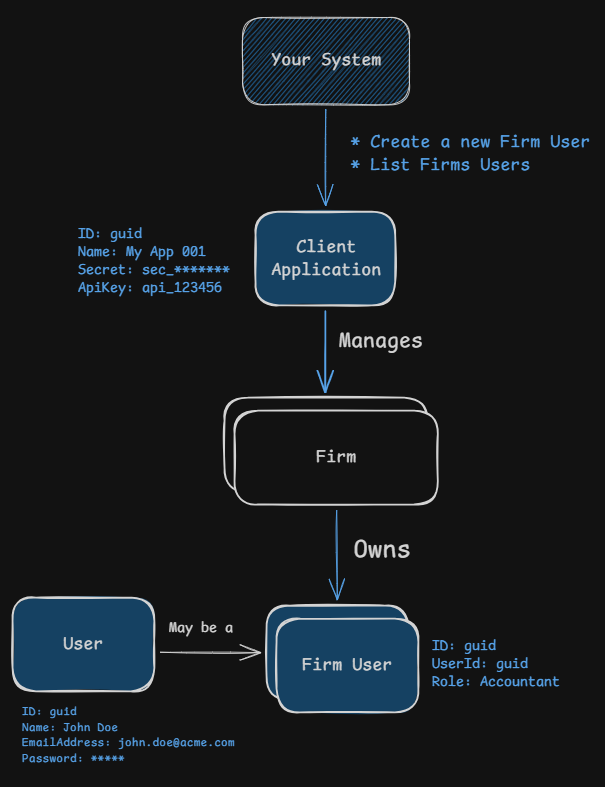
Understanding Firm Users
Firm users represent individuals who have access to manage firms and their associated taxpayers. Once created, they can access the platform to manage taxpayers, tax entities, and tax payments, or you can use the API on their behalf.
Firm User Object Structure:
| Field | Type | Description |
|---|---|---|
id | guid | Unique identifier for the firm user Example: 029bc3f4-d65e-73f7-8133-f5800e825510 |
externalId | string | Your system’s unique identifier Example: my_firm_user_123 |
role | string | Role of the firm user Example: Admin, Accountant, TeamMember, ReadOnly |
permissions | array of strings | Permissions granted to the firm user Example: ["ViewClients", "CreateNewClients"] |
user | User | Details of the associated user |
User Object (Create Request):
| Field | Type | Description |
|---|---|---|
emailAddress | string | Required. Email address of the user Example: jane.doe@acme.com |
name | string | Required. First name of the user Example: Jane |
lastName | string | Required. Last name of the user Example: Doe |
phoneNumber | string | Optional. Phone number in E.164 format Example: +1234567890 |
Firm User Roles and Permissions
| Role | Permissions |
|---|---|
| Admin | All permissions (unrestricted access) |
| Accountant | ViewClients, CreateNewClients, SendClientInvites, EditClientsOptional: CanOwnClients, CanSendApprovalDirectlyToClient |
| TeamMember | ViewClients, CreateNewClients, SendClientInvites, EditClientsOptional: CanOwnClients, CanSendApprovalDirectlyToClient |
| ReadOnly | ViewClients only |
To grant optional permissions for Accountant or TeamMember roles, include them in the optionalPermissions array when creating the user.
Important: CanOwnClients is required for a firm user to be set as the ownerFirmUserId of a taxpayer (see Use Case 3). Admin users always have it. If your integration assigns taxpayers to Accountant or TeamMember users, create them with "optionalPermissions": ["CanOwnClients"].
Create a Firm User
Sequence of Events:
- Your system sends a request to create a firm user using an external ID and associates it with an existing firm
- Remitian responds with the created firm user’s details
- Your system can then use this
idfor subsequent operations
HTTP Request (Basic):
POST https://public-api.remitian.com/v1/firms/{firmId}/firm-users
Content-Type: application/json
Authorization: Bearer YOUR_ACCESS_TOKEN
x-api-key: YOUR_API_KEY

{
  "externalId": "my_firm_user_123",
  "role": "Accountant",
  "user": {
    "emailAddress": "jane.doe@acme.com",
    "name": "Jane",
    "lastName": "Doe",
    "phoneNumber": "+1234567890"
  }
}
HTTP Request (With Optional Permissions):
POST https://public-api.remitian.com/v1/firms/{firmId}/firm-users
Content-Type: application/json
Authorization: Bearer YOUR_ACCESS_TOKEN
x-api-key: YOUR_API_KEY

{
  "externalId": "my_firm_user_456",
  "role": "TeamMember",
  "optionalPermissions": ["CanOwnClients", "CanSendApprovalDirectlyToClient"],
  "user": {
    "emailAddress": "john.smith@acme.com",
    "name": "John",
    "lastName": "Smith",
    "phoneNumber": "+1234567890"
  }
}
HTTP Response:
HTTP/1.1 201 Created
Content-Type: application/json

{
  "id": "029bc3f4-d65e-73f7-8133-f5800e825510",
  "firmId": "019bc3f4-d65e-73f7-8133-f5800e825509",
  "externalId": "my_firm_user_123",
  "userId": "039bc3f4-d65e-73f7-8133-f5800e825511",
  "role": "Accountant",
  "permissions": [
    "ViewClients",
    "CreateNewClients",
    "SendClientInvites",
    "EditClients"
  ]
}
List Firm Users
Sequence of Events:
- Your system sends a request to list all firm users associated with a specific firm
- You can filter firm users by
externalIdif needed - Remitian responds with a paginated list of firm users
HTTP Request:
GET https://public-api.remitian.com/v1/firms/{firmId}/firm-users?externalId=my_firm_user
Authorization: Bearer YOUR_ACCESS_TOKEN
x-api-key: YOUR_API_KEY
HTTP Response:
HTTP/1.1 200 OK
Content-Type: application/json

{
  "items": [
    {
      "id": "029bc3f4-d65e-73f7-8133-f5800e825510",
      "externalId": "my_firm_user_123",
      "role": "Accountant",
      "permissions": [
        "ViewClients",
        "CreateNewClients",
        "SendClientInvites",
        "EditClients"
      ],
      "user": {
        "id": "039bc3f4-d65e-73f7-8133-f5800e825511",
        "name": "Jane",
        "lastName": "Doe",
        "fullName": "Jane Doe",
        "emailAddress": "jane.doe@acme.com",
        "phoneNumber": "+1234567890",
        "isTwoFactorEnabled": false,
        "isActive": true,
        "inviteStatus": "Accepted"
      }
    }
  ],
  "currentPage": 1,
  "pageSize": 10,
  "totalCount": 1,
  "totalPages": 1
}
Remove a Firm User
Sequence of Events:
- Your system sends a request to remove a firm user using the
firmIdand thefirmUserId - Remitian responds with a confirmation of the removal
HTTP Request:
DELETE https://public-api.remitian.com/v1/firms/{firmId}/firm-users/{firmUserId}
Authorization: Bearer YOUR_ACCESS_TOKEN
x-api-key: YOUR_API_KEY
HTTP Response:
HTTP/1.1 204 No Content
Note: A firm user who owns one or more taxpayers cannot be removed; the request fails with 403 Forbidden. Change the owner of those taxpayers first (see Use Case 3). A firm user who has not accepted the invite yet (isActive: false, inviteStatus: Sent) can be removed.