

- Use Case 3: Manage Taxpayers
- Use Case 3: Manage Taxpayers
Use Case 3: Manage Taxpayers
Use Case 3: Manage Taxpayers
List, find by TIN, deactivate and change the owner of the taxpayers of a firm, and choose how to create them.
Synchronize taxpayer data between your system and Remitian. Create, list, deactivate, and change the owner of taxpayers associated with firms using your system’s taxpayer ID with the externalId field, or find them by TIN with encryptedTin.
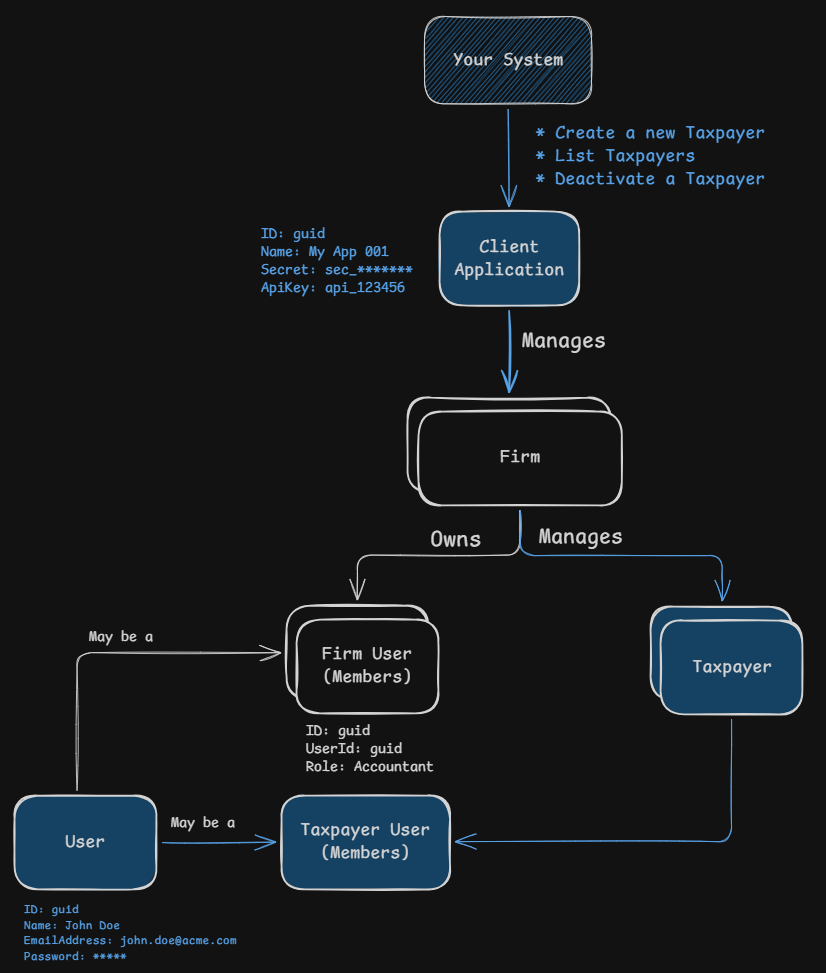
Understanding Taxpayers
Taxpayers represent a container for tax entities and tax accounts within the Remitian system. Once created, you can add tax entities (e.g., individuals, businesses), schedule tax payments, and import tax forms.
Taxpayer Object Structure:
| Field | Type | Description |
|---|---|---|
taxpayerId | guid | Unique identifier for the taxpayer Example: 029bc3f4-d65e-73f7-8133-f5800e825510 |
externalId | string | Your system’s unique identifier Example: my_taxpayer_123 |
businessId | string | User interface friendly identifier Example: TP-654321 |
name | string | Name of the taxpayer Example: John Doe |
userId | guid | Unique identifier for the associated user, returned in the create response Example: 049bc3f4-d65e-73f7-8133-f5800e825512 |
taxpayerUser | Object | Information about the taxpayer user |
Create Taxpayers
There are two ways to create a taxpayer, both described in Provision and Create Taxpayers:
- Provision a Taxpayer with Tax Entities and Tax Accounts: finds or creates the taxpayer, its tax entities and their tax accounts in a single call. It is safe to retry.
- Create a Taxpayer: creates only the taxpayer and its user. You then add tax entities and tax accounts with Use Case 4 and Use Case 5.
List Taxpayers
Sequence of Events:
- Your system sends a request to list all taxpayers associated with a specific firm
- You can filter taxpayers by
externalId,emailAddressand/orencryptedTinif needed - Remitian responds with a paginated list of taxpayers
Query Parameters:
| Parameter | Type | Description |
|---|---|---|
externalId | string | Filter by your system’s taxpayer ID Example: my_taxpayer_123 |
emailAddress | string | Filter by the taxpayer user’s email address. Exact match, case-insensitive Example: john.doe@acme.com |
encryptedTin | string | Filter by the TIN of the taxpayer’s tax entities, exact match. The TIN encrypted with the Remitian public key, base64url without padding. An empty value is ignored and does not filter. See Find Taxpayers by TIN below |
pageNumber | number | Page to retrieve Example: 1 |
pageSize | number | Items per page Example: 10 |
HTTP Request:
GET https://public-api.remitian.com/v1/firms/{firmId}/taxpayers?emailAddress=john.doe@acme.com
Authorization: Bearer YOUR_ACCESS_TOKEN
x-api-key: YOUR_API_KEY
HTTP Response:
HTTP/1.1 200 OK
Content-Type: application/json

{
  "items": [
    {
      "id": "029bc3f4-d65e-73f7-8133-f5800e825510",
      "externalId": "my_taxpayer_123",
      "businessId": "TP-654321",
      "name": "John Doe",
      "taxpayerUser": {
        "id": "039bc3f4-d65e-73f7-8133-f5800e825511",
        "user": {
          "id": "049bc3f4-d65e-73f7-8133-f5800e825512",
          "businessId": "UR-789012",
          "name": "John",
          "lastName": "Doe",
          "fullName": "John Doe",
          "emailAddress": "john.doe@acme.com",
          "isActive": true,
          "inviteStatus": "Accepted"
        }
      }
    }
  ],
  "currentPage": 1,
  "pageSize": 10,
  "totalCount": 1,
  "totalPages": 1
}
When filters are combined, only taxpayers matching all of them are returned.
Find Taxpayers by TIN
The TIN belongs to the tax entity, not to the taxpayer. To find the taxpayers that own a tax entity with a given TIN, without listing the tax entities of each taxpayer, send the encrypted TIN in encryptedTin when listing taxpayers.
Sequence of Events:
- Your system encrypts the TIN (SSN, ITIN or EIN, 9 digits without hyphens) with the Remitian TIN encryption public key, as described in Filter Tax Entities by TIN
- Your system sends the list request with the encrypted value in
encryptedTin - Remitian decrypts it and responds with the taxpayers of the firm that own a tax entity with that TIN
HTTP Request:
GET https://public-api.remitian.com/v1/firms/{firmId}/taxpayers?encryptedTin={encryptedTin}
Authorization: Bearer YOUR_ACCESS_TOKEN
x-api-key: YOUR_API_KEY
The response has the same format as List Taxpayers. A taxpayer cannot have two tax entities with the same TIN, but the same TIN can belong to tax entities of different taxpayers, so the list can have more than one taxpayer. Each taxpayer appears once. Only taxpayers of the firm in the path are returned; no match returns an empty list.
Errors:
The errors are the same as in Filter Tax Entities by TIN: a value that cannot be decoded or decrypted, or a decrypted TIN in an invalid format, returns 400 Bad Request with the TaxEntity.InvalidEncryptedTin error, and an environment without TIN encryption returns 404 Not Found. The response never repeats the value sent.
Deactivate a Taxpayer
Sequence of Events:
- Your system sends a request to deactivate a taxpayer using the
taxpayerId - Remitian responds with a confirmation of the deactivation
HTTP Request:
DELETE https://public-api.remitian.com/v1/taxpayers/{taxpayerId}
Authorization: Bearer YOUR_ACCESS_TOKEN
x-api-key: YOUR_API_KEY
HTTP Response:
HTTP/1.1 204 No Content
Change the Owner of a Taxpayer
Sequence of Events:
- Your system sends a request with the
ownerFirmUserIdof the new owner, using thefirmIdand thetaxpayerId - Remitian responds with a confirmation of the change
HTTP Request:
POST https://public-api.remitian.com/v1/firms/{firmId}/taxpayers/{taxpayerId}/change-owner-firm-user
Content-Type: application/json
Authorization: Bearer YOUR_ACCESS_TOKEN
x-api-key: YOUR_API_KEY

{
  "ownerFirmUserId": "029bc3f4-d65e-73f7-8133-f5800e825510"
}
Note: The new owner must be allowed to own clients: either an Admin, or an Accountant/TeamMember created with CanOwnClients in optionalPermissions (see Use Case 2). Otherwise the request fails with 403 Forbidden and the message Owner user does not have permission to own clients. The new owner does not need to be active or to have accepted its invite.
HTTP Response:
HTTP/1.1 204 No Content