

- Use Case 4: Manage Tax Entities
- Use Case 4: Manage Tax Entities
Use Case 4: Manage Tax Entities
Use Case 4: Manage Tax Entities
Create and list individual and business tax entities, and find them by encrypted TIN.
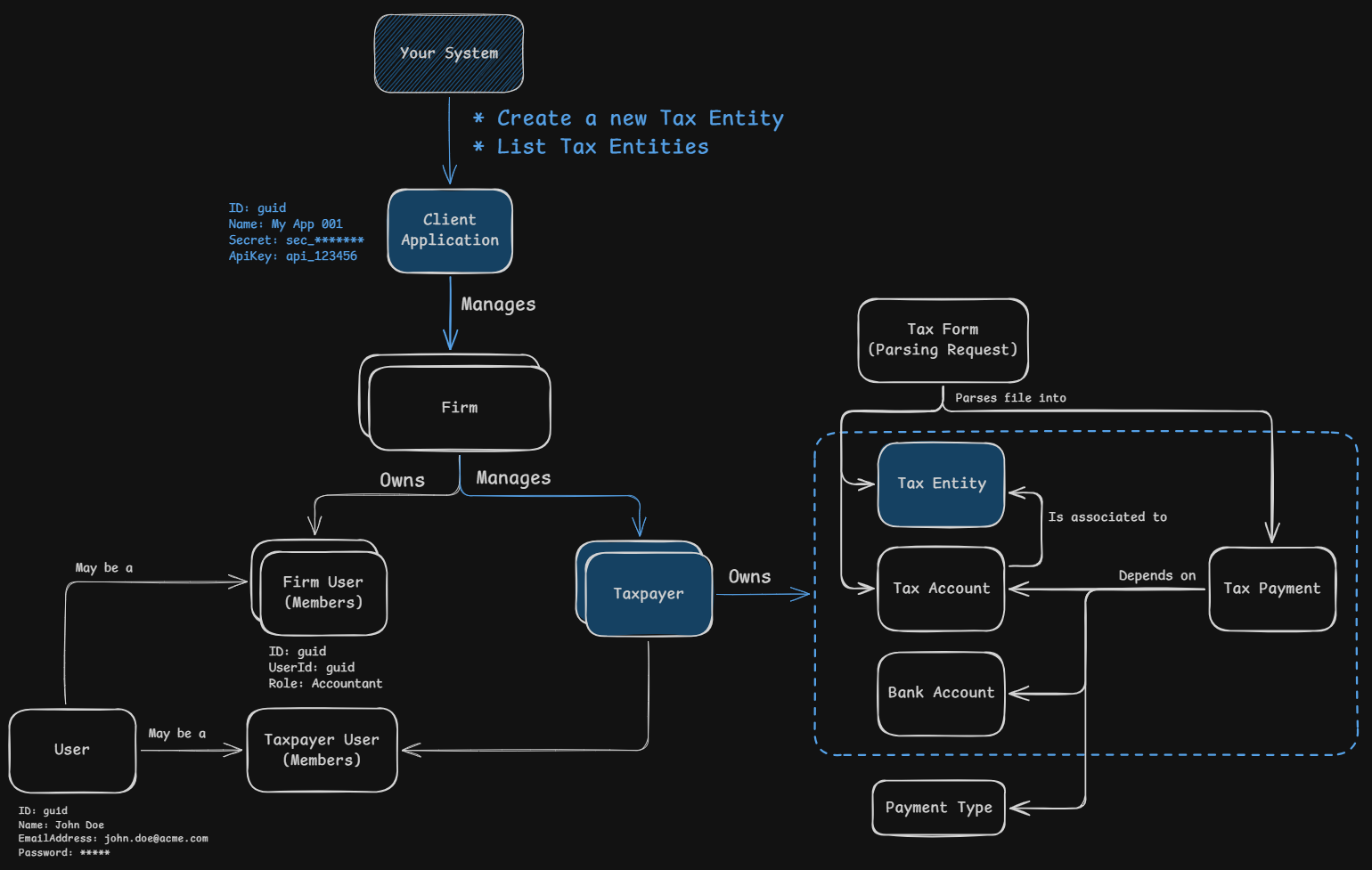
Manage tax entities associated with taxpayers. Create and list tax entities using your system’s tax entity ID with the externalId field, or find them by TIN with encryptedTin. Each tax entity must be associated with an existing taxpayer.
Understanding Tax Entities
Tax entities represent individuals or businesses that have tax accounts. Once created, you can add tax accounts for them and schedule tax payments.
Available Tax Entity Types:
IrsSsn- Individual with Social Security NumberIrsEin- Business with Employer Identification Number
Individual Tax Entity Object Structure:
| Field | Type | Description |
|---|---|---|
id | guid | Unique identifier for the tax entity Example: 039bc3f4-d65e-73f7-8133-f5800e825511 |
externalId | string | Your system’s unique identifier Example: my_individual_entity_123 |
type | string | Type of the tax entity Example: IrsSsn |
tin | string | Tax Identification Number, 9 digits without hyphens. Masked in responses for individual tax entities, showing only the last 2 digits Example: *******89 |
firstName | string | First name Example: Alice |
lastName | string | Last name Example: Smith |
address | Address | (Optional) Address details, for individual and business tax entities. When sent, city, region, country and postalCode are required (postalCode with 5 digits for US). A request that breaks these rules is rejected with 400 Bad Request. Some tax payments depend on it, so send it whenever you have it. Returned as null when the tax entity has no address |
externalId must be 3 to 100 characters long and contain only letters, numbers, spaces, underscores, commas, periods or hyphens.
Create an Individual Tax Entity
Sequence of Events:
- Your system sends a request to create a tax entity using an external ID and associates it with an existing taxpayer
- Remitian responds with the created tax entity’s details
- Your system can then use this
idfor subsequent operations
HTTP Request:
POST https://public-api.remitian.com/v1/taxpayers/{taxpayerId}/tax-entities
Content-Type: application/json
Authorization: Bearer YOUR_ACCESS_TOKEN
x-api-key: YOUR_API_KEY

{
  "externalId": "my_individual_entity_123",
  "type": "IrsSsn",
  "tin": "123456789",
  "firstName": "Alice",
  "lastName": "Smith",
  "address": {
    "address1": "123 Main St",
    "address2": "Suite 4B",
    "city": "Springfield",
    "region": "IL",
    "country": "US",
    "postalCode": "62701"
  }
}
HTTP Response:
HTTP/1.1 201 Created
Content-Type: application/json

{
  "id": "039bc3f4-d65e-73f7-8133-f5800e825511",
  "externalId": "my_individual_entity_123"
}
Create a Business Tax Entity
Sequence of Events:
- Your system sends a request to create a business tax entity using an external ID
- Remitian responds with the created business tax entity’s details
- Your system can then use this
idfor subsequent operations
HTTP Request:
POST https://public-api.remitian.com/v1/taxpayers/{taxpayerId}/tax-entities
Content-Type: application/json
Authorization: Bearer YOUR_ACCESS_TOKEN
x-api-key: YOUR_API_KEY

{
  "externalId": "my_business_entity_456",
  "type": "IrsEin",
  "tin": "123456789",
  "businessName": "Acme Corporation",
  "address": {
    "address1": "456 Corporate Blvd",
    "address2": "Floor 10",
    "city": "Metropolis",
    "region": "NY",
    "country": "US",
    "postalCode": "10001"
  }
}
HTTP Response:
HTTP/1.1 201 Created
Content-Type: application/json

{
  "id": "049bc3f4-d65e-73f7-8133-f5800e825512",
  "externalId": "my_business_entity_456"
}
List Tax Entities
Sequence of Events:
- Your system sends a request to list all tax entities associated with a specific taxpayer
- You can filter tax entities by
externalIdand/orencryptedTinif needed - Remitian responds with a paginated list of tax entities
Query Parameters:
| Parameter | Type | Description |
|---|---|---|
externalId | string | Filter by your system’s tax entity ID Example: my_individual_entity_123 |
encryptedTin | string | Filter by exact TIN match. The TIN encrypted with the Remitian public key, base64url without padding. See Filter Tax Entities by TIN. The response format of the TIN does not change |
pageNumber | number | Page to retrieve Example: 1 |
pageSize | number | Items per page Example: 10 |
When externalId and encryptedTin are combined, only tax entities matching both are returned.
HTTP Request:
GET https://public-api.remitian.com/v1/taxpayers/{taxpayerId}/tax-entities
Authorization: Bearer YOUR_ACCESS_TOKEN
x-api-key: YOUR_API_KEY
HTTP Response:
HTTP/1.1 200 OK
Content-Type: application/json

{
  "items": [
    {
      "id": "039bc3f4-d65e-73f7-8133-f5800e825511",
      "externalId": "my_individual_entity_123",
      "type": "IrsSsn",
      "tin": "*******89",
      "firstName": "Alice",
      "lastName": "Smith",
      "address": {
        "address1": "123 Main St",
        "address2": "Suite 4B",
        "city": "Springfield",
        "region": "IL",
        "country": "US",
        "postalCode": "62701"
      }
    },
    {
      "id": "049bc3f4-d65e-73f7-8133-f5800e825512",
      "externalId": "my_business_entity_456",
      "type": "IrsEin",
      "tin": "123456789",
      "businessName": "Acme Corporation",
      "address": {
        "address1": "456 Corporate Blvd",
        "address2": "Floor 10",
        "city": "Metropolis",
        "region": "NY",
        "country": "US",
        "postalCode": "10001"
      }
    }
  ],
  "currentPage": 1,
  "pageSize": 10,
  "totalCount": 2,
  "totalPages": 1
}
Filter by TIN
The TIN is sensitive data: Remitian never accepts it in plaintext in a URL. To find a tax entity by TIN, encrypt the TIN with the Remitian public key and send it in the encryptedTin filter of the tax entity list.
See Filter Tax Entities by TIN for the encryption parameters, code examples, errors and key rotation.
Tip: To create a taxpayer, its tax entities and their tax accounts in a single call, see Provision a Taxpayer.
Next Steps
Once a tax entity exists, you can create tax accounts for it (see Use Case 5) and manage its tax identity verifications with tax authorities (see Use Case 6: Manage Tax Identity Verifications).