

- Use Cases
- Use Case 1: Manage Firms
Use Cases
Use Case 1: Manage Firms
Create and list firms using your system's firm ID with the externalId field.
Synchronize firm data between your system and Remitian. Create and list firms using your system’s firm ID with the externalId field.
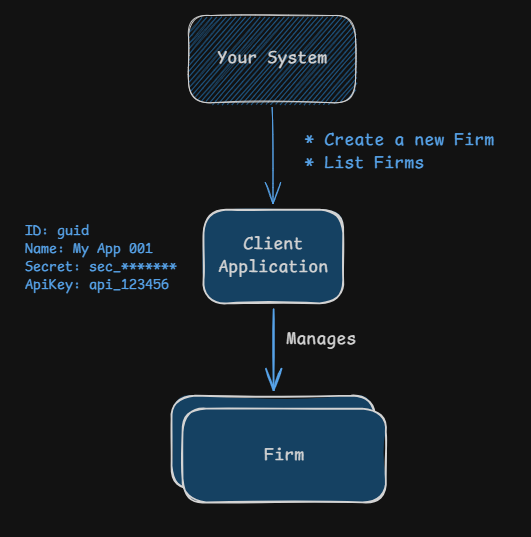
Understanding Firms
Firms represent accounting or tax firms within the Remitian system. Each firm can have multiple taxpayers associated with it. All taxpayers must be associated with a firm, thus you need to create firms before adding taxpayers and scheduling tax payments.
Firm Object Structure:
| Field | Type | Description |
|---|---|---|
firmId | guid | Unique identifier for the firm in Remitian Example: 019bc3f4-d65e-73f7-8133-f5800e825509 |
externalId | string | Your system’s unique identifier for the firm Example: my_firm_123 |
businessId | string | User interface friendly identifier Example: FM-123456 |
name | string | Name of the firm Example: Acme Accounting |
Create a Firm
Sequence of Events:
- Your system sends a request to create a firm in Remitian using an external ID
- Remitian responds with the created firm’s details, including a unique
firmId - Your system can then use this
firmIdfor subsequent operations
Firm Settings:
The optional settings object controls how the firm operates:
| Field | Type | Description |
|---|---|---|
requireInternalApproval | boolean | Whether tax payments created for the firm’s taxpayers require internal (accountant) approval before being sent to the taxpayer. When true, payments for taxpayers owned by a firm user, including the payments created through the Public API, start in pending accountant approval and cannot be paid directly by the taxpayer (e.g. through the widget’s Pay with Remitian flow) until approved. A payment created through the Public API is the exception when skipClientApproval is also true: it starts in QueuedForPayment. Defaults to false when not informed. |
skipClientApproval | boolean | Whether tax payments created for the firm’s taxpayers skip the taxpayer (client) approval, starting in QueuedForPayment instead of PendingClientApproval. Applies to every payment created through the Public API, whatever the value of requireInternalApproval. For the payments created in the Remitian platform, it applies to the ones that do not need internal approval: payments created by any firm user when requireInternalApproval is false, and payments created by the firm user that owns the taxpayer, by a firm Admin or by a firm user with the CanSendApprovalDirectlyToClient permission. Payments that need internal approval start in PendingAccountantApproval and still move to PendingClientApproval after the accountant approves them. Defaults to false when not informed. |
These settings can be changed later with PATCH /v1/firms/{firmId}. Settings not informed in the request keep their current values. For how the settings decide the starting status of a tax payment, see Payment Approval.
HTTP Request:
POST https://public-api.remitian.com/v1/firms
Content-Type: application/json
Authorization: Bearer YOUR_ACCESS_TOKEN
x-api-key: YOUR_API_KEY

{
  "externalId": "my_firm_123",
  "name": "Acme Accounting",
  "settings": {
    "requireInternalApproval": false,
    "skipClientApproval": true
  }
}
HTTP Response:
HTTP/1.1 201 Created
Content-Type: application/json

{
  "id": "019bc3f4-d65e-73f7-8133-f5800e825509",
  "externalId": "my_firm_123"
}
List Firms
Sequence of Events:
- Your system sends a request to list all firms associated with your Client Application
- You can filter firms by
externalIdif needed - Remitian responds with a paginated list of firms
HTTP Request:
GET https://public-api.remitian.com/v1/firms?externalId=my_firm_123
Authorization: Bearer YOUR_ACCESS_TOKEN
x-api-key: YOUR_API_KEY
HTTP Response:
HTTP/1.1 200 OK
Content-Type: application/json

{
  "items": [
    {
      "id": "019bc3f4-d65e-73f7-8133-f5800e825509",
      "externalId": "my_firm_123",
      "businessId": "FM-123456",
      "name": "Acme Accounting"
    }
  ],
  "currentPage": 1,
  "pageSize": 10,
  "totalCount": 1,
  "totalPages": 1
}